
Your model. Your agents. Your rules.
Desk works with a model on your own PC or with your own cloud key, and gives your AI agents a real workspace to work in. Every AI feature, and every agent, follows the access you set for each Space, List and Doc.
On your PC, or with your own key.
A model on this PC
Connect LM Studio, Ollama or any OpenAI-compatible server running on your computer. Desk lists the models the server offers. Nothing leaves your PC, and it needs no account.
Your own cloud key
Add a key for Anthropic, OpenAI or Google Gemini, and pick from that provider's own models. Keys are kept in Windows Credential Manager, never in your workspace or its backups.
You see what it costs
Desk counts the tokens each provider reports for the month, and says where text is going before anything is sent.
AI where you already are.
Ask AI, beside your work
- Choose where it looks: this List or Doc, its Folder, the whole Space, or everything AI may read.
- Choose the model and how hard it thinks, from Quick to Thorough. Models an item's AI access doesn't allow are shown but can't be picked.
- Search the web with a cloud model when you want, one question at a time.
- Have it act: it proposes changes to status, people, dates, tags and more, shown before and after, and nothing changes until you accept.
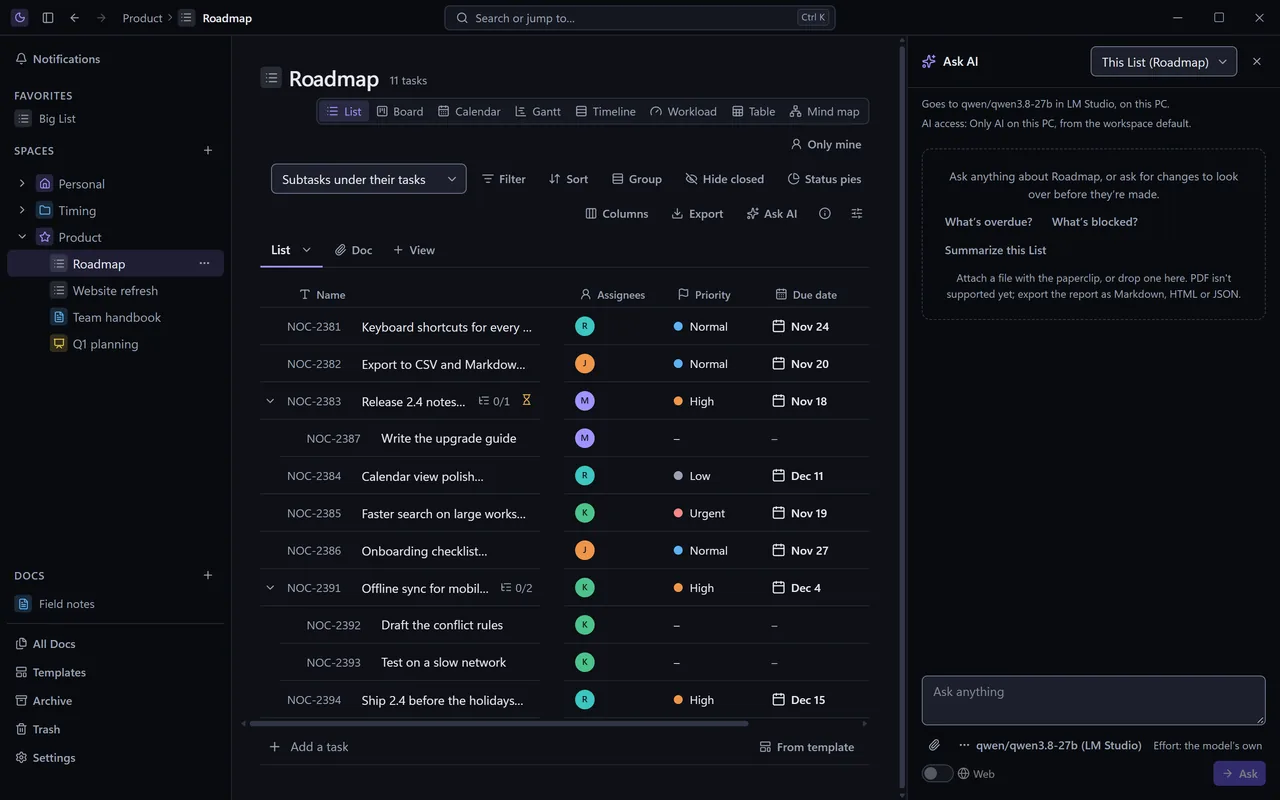
Ask AI
Open it beside a List or a Doc with Ctrl+Shift+A. Ask what's blocked, summarize a page, or attach a report and get a task for each finding. Ask for changes, to one task or a whole List, and they come back as a preview to accept.
Ask your workspace
Type ? in Ctrl+K and ask a question across your Docs and tasks. The answer cites its sources, each one opens where it came from, and you can save the answer as a page.
Writing in Docs
Draft with /ai or Ctrl+J. On selected text, rewrite, shorten, expand, fix grammar, change the tone, translate or summarize. Every result is a suggestion, and one Ctrl+Z puts the original back.
AI fields
A custom field the model fills from each task, one at a time or across a whole List at once. A bulk fill is undone with one Undo.
AI steps in automations
Let an automation triage new tasks, route them to a List or person, draft a reply, or keep a changelog page current. The model can only set what the step allows, and the run log shows what it did and why.
Signed by the model
Every change AI makes is recorded under the model's name, so you can always see what was written by a person and what wasn't.
Decide what AI may read, item by item.
Set it on the whole workspace, a Space, a Folder, a List or a Doc. Anything inside follows unless it's set more strictly. Desk's AI features and your agents both honor it.
| Setting | Desk's AI features | AI agents |
|---|---|---|
| Cloud AI allowed | May use a model on this PC or a cloud provider. | Any agent you've given access. |
| Only AI on this PC | Only a model running on your computer. | Hidden from agents that use a cloud model. |
| No AI | Never sent to any model. | Hidden from every agent. |
| Inherit | Follows the Folder, Space or workspace it's in. | Follows the Folder or Space it's in. |
A workspace your agents can work in.
Nocturnal's MCP server lets Claude Code, Codex and other AI tools on your PC read and update your tasks, Docs and whiteboards, and comment where you'd talk to a colleague.
- Its own access. Each agent gets its own token and permissions for each Space and List: read, comment, write, or write and delete.
- Nothing silent. Every change an agent makes carries its name, can be undone, and shows in the activity of what it touched. Deletes wait for your approval.
- It knows where to look. Turn on knowledge base help, and an agent starts each session with an index of your knowledge base, looks up the sections it needs, and is warned before it writes something that repeats or contradicts what's there.
- Claude Code's hook. One command adds a hook that shows the agent the sections that match your prompt before it starts.
Try it on your own work.
Nocturnal Desk is free and in early access for Windows.